<?xml version="1.0" encoding="UTF-8"?>
<rss version="2.0"
	xmlns:content="http://purl.org/rss/1.0/modules/content/"
	xmlns:wfw="http://wellformedweb.org/CommentAPI/"
	xmlns:dc="http://purl.org/dc/elements/1.1/"
	xmlns:atom="http://www.w3.org/2005/Atom"
	>

<channel>
	<title>Watson.me.uk</title>
	<atom:link href="http://watson.me.uk/Index.php?feed=rss2" rel="self" type="application/rss+xml" />
	<link>http://watson.me.uk</link>
	<description>An adventure in blandness</description>
	<pubDate>Sun, 02 Aug 2009 15:51:04 +0000</pubDate>
	<generator>http://wordpress.org/?v=2.5</generator>
	<language>en</language>
			<item>
		<title>Moon landing in Google Earth</title>
		<link>http://watson.me.uk/?p=222</link>
		<comments>http://watson.me.uk/?p=222#comments</comments>
		<pubDate>Sun, 02 Aug 2009 15:51:04 +0000</pubDate>
		<dc:creator>Chris</dc:creator>
		
		<category><![CDATA[Uncategorized]]></category>

		<guid isPermaLink="false">http://watson.me.uk/?p=222</guid>
		<description><![CDATA[If you&#8217;ve got Google Earth it&#8217;s worth having a look at the moon landing recreation that&#8217;s been added for the 40th anniversary of the first lunar landing. The Apollo 11 mission fly-through is a real highlight. http://earth.google.com/moon.
In other space related news, after the recent cheese in space failure, El Reg has decided to put a [...]]]></description>
			<content:encoded><![CDATA[<p>If you&#8217;ve got Google Earth it&#8217;s worth having a look at the moon landing recreation that&#8217;s been added for the 40th anniversary of the first lunar landing. The Apollo 11 mission fly-through is a real highlight. <a href="http://earth.google.com/moon/">http://earth.google.com/moon</a>.</p>
<p>In other space related news, after the recent <a href="http://news.bbc.co.uk/1/hi/sci/tech/8171728.stm">cheese in space failure</a>, El Reg has decided to put a paper plane in space. For god&#8217;s sake don&#8217;t let them <a href="http://www.theregister.co.uk/2009/07/31/paris_vehicle_poll/">name it</a> El Shag.</p>
]]></content:encoded>
			<wfw:commentRss>http://watson.me.uk/?feed=rss2&amp;p=222</wfw:commentRss>
		</item>
		<item>
		<title>Firefox Add-ons</title>
		<link>http://watson.me.uk/?p=221</link>
		<comments>http://watson.me.uk/?p=221#comments</comments>
		<pubDate>Sat, 13 Jun 2009 22:25:39 +0000</pubDate>
		<dc:creator>Chris</dc:creator>
		
		<category><![CDATA[Computers]]></category>

		<guid isPermaLink="false">http://watson.me.uk/?p=221</guid>
		<description><![CDATA[For personal reference. A list of useful Firefox Add-ons.

Xmarks (previously Foxmarks). Bookmarks synchronisation. http://download.xmarks.com/download
OpenDownload. Mimics IE&#8217;s &#8220;run from current location&#8221;. https://addons.mozilla.org/en-US/firefox/addon/207
Default Full Zoom Level. Allows a full zoom (ie. not text only) level to be set which will be used when visiting new websites for the first time. Useful when using Firefox on a PC [...]]]></description>
			<content:encoded><![CDATA[<p>For personal reference. A list of useful Firefox Add-ons.</p>
<ul>
<li>Xmarks (previously Foxmarks). Bookmarks synchronisation. <a href="http://download.xmarks.com/download">http://download.xmarks.com/download</a></li>
<li>OpenDownload. Mimics IE&#8217;s &#8220;run from current location&#8221;. <a href="https://addons.mozilla.org/en-US/firefox/addon/207">https://addons.mozilla.org/en-US/firefox/addon/207</a></li>
<li>Default Full Zoom Level. Allows a full zoom (ie. not text only) level to be set which will be used when visiting new websites for the first time. Useful when using Firefox on a PC using a TV as monitor. <a href="https://addons.mozilla.org/en-US/firefox/addon/6965">https://addons.mozilla.org/en-US/firefox/addon/6965</a></li>
<li>Cooliris. Funky 3D wall for viewing pictures on the web (Google image search results, Facebook, etc). <a href="https://addons.mozilla.org/en-US/firefox/addon/5579">https://addons.mozilla.org/en-US/firefox/addon/5579</a></li>
<li>Adblock Plus. Blocks adverts on webpages (use the Easylist subscription). <a href="https://addons.mozilla.org/en-US/firefox/addon/1865">https://addons.mozilla.org/en-US/firefox/addon/1865</a></li>
</ul>
]]></content:encoded>
			<wfw:commentRss>http://watson.me.uk/?feed=rss2&amp;p=221</wfw:commentRss>
		</item>
		<item>
		<title>UltraMon and Startup Control Panel</title>
		<link>http://watson.me.uk/?p=220</link>
		<comments>http://watson.me.uk/?p=220#comments</comments>
		<pubDate>Tue, 16 Dec 2008 00:54:51 +0000</pubDate>
		<dc:creator>Chris</dc:creator>
		
		<category><![CDATA[Computers]]></category>

		<guid isPermaLink="false">http://watson.me.uk/?p=220</guid>
		<description><![CDATA[A couple of useful applications out there on the internets.
UltraMon is for multi-monitor setups. 

Gives you a quick way of moving windows between desktops, even when they are full screen
Creates a composite wallpaper image for use accross whole desktop (different wallpaper on each monitor)
And the best feature is: a seperate task bar on your extended [...]]]></description>
			<content:encoded><![CDATA[<p>A couple of useful applications out there on the internets.</p>
<p><a href="http://www.realtimesoft.com/ultramon/">UltraMon</a> is for multi-monitor setups. </p>
<ul>
<li>Gives you a quick way of moving windows between desktops, even when they are full screen</li>
<li>Creates a composite wallpaper image for use accross whole desktop (different wallpaper on each monitor)</li>
<li>And the best feature is: a seperate task bar on your extended monitor. Only shows the windows on that window (and they are removed from the standard taskbar on the main monitor)</li>
</ul>
<p><a href="http://www.mlin.net/StartupCPL.shtml">Startup Control Panel</a>. First used this as a replacement for msconfig on Windows 2000. Very handy installed as a control panel applet (though it doesn&#8217;t have to be to work). Shows all the different places (registry keys, startup folder, etc) that applications may have hidden themselves away to start at boot/logon.</p>
]]></content:encoded>
			<wfw:commentRss>http://watson.me.uk/?feed=rss2&amp;p=220</wfw:commentRss>
		</item>
		<item>
		<title>Stephen Hawking was in Star Trek</title>
		<link>http://watson.me.uk/?p=219</link>
		<comments>http://watson.me.uk/?p=219#comments</comments>
		<pubDate>Thu, 11 Sep 2008 20:01:26 +0000</pubDate>
		<dc:creator>Chris</dc:creator>
		
		<category><![CDATA[Television]]></category>

		<guid isPermaLink="false">http://watson.me.uk/?p=219</guid>
		<description><![CDATA[The other day, while admiring Google&#8217;s LHC logo, Stephen Hawking&#8217;s (who is neither dead, kicked by a horse, or played Superman) appearance on Star Trek TNG came up. Yes Nick, he really was in it, and this clip I found on Youtube is what started the episode that was on BBC 2 a few weeks [...]]]></description>
			<content:encoded><![CDATA[<p>The other day, while admiring Google&#8217;s LHC logo, Stephen Hawking&#8217;s (who is neither dead, kicked by a horse, or played Superman) appearance on Star Trek TNG came up. Yes Nick, he really was in it, and this clip I found on Youtube is what started the episode that was on BBC 2 a few weeks ago. I could barely believe what I was seeing&#8230;</p>
<p><img src="http://img238.imageshack.us/img238/7895/lhcwe8.gif" alt="Google Large Hydron Collider logo" /></p>
<p><object width="425" height="344"><param name="movie" value="http://www.youtube.com/v/5O31qRH3O6c&#038;hl=en&#038;fs=1&#038;color1=0x2b405b&#038;color2=0x6b8ab6"></param><param name="allowFullScreen" value="true"></param><embed src="http://www.youtube.com/v/5O31qRH3O6c&#038;hl=en&#038;fs=1&#038;color1=0x2b405b&#038;color2=0x6b8ab6" type="application/x-shockwave-flash" allowfullscreen="true" width="425" height="344"></embed></object></p>
<p>PS <a href="http://www.sho.com/site/weeds/season4/images/downloads/weeds_sdcg_calendar2008.pdf" title="PDF!">Belle</a>&#8217;s <a href="http://www.radiotimes.com/ListingsServlet?event=10&#038;channelId=185&#038;programmeId=84316376&#038;jspLocation=/jsp/prog_details.jsp">back</a>.</p>
<a href="javascript:toggleStartStop();PicLensLite.start({feedUrl:'http://watson.me.uk/wp-content/plugins/wp-piclens/mrss.php?id=219'});">Start Slide Show with PicLens Lite <img src="http://watson.me.uk/wp-content/plugins/wp-piclens/PicLensButton.png" alt="PicLens" width="16" height="12" border="0" align="top"></a>]]></content:encoded>
			<wfw:commentRss>http://watson.me.uk/?feed=rss2&amp;p=219</wfw:commentRss>
		</item>
		<item>
		<title>Virgin Media broadband</title>
		<link>http://watson.me.uk/?p=217</link>
		<comments>http://watson.me.uk/?p=217#comments</comments>
		<pubDate>Wed, 27 Aug 2008 23:36:03 +0000</pubDate>
		<dc:creator>Chris</dc:creator>
		
		<category><![CDATA[Computers]]></category>

		<guid isPermaLink="false">http://watson.me.uk/?p=217</guid>
		<description><![CDATA[

&#8230;sweeeeeeeet.
Start Slide Show with PicLens Lite ]]></description>
			<content:encoded><![CDATA[<p><a href="http://www.speedtest.net"><img src="http://www.speedtest.net/result/314728780.png"></a></p>
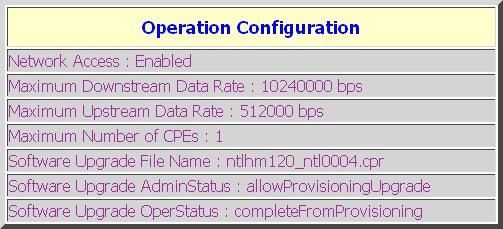
<p><a href='http://watson.me.uk/wp-content/uploads/2008/08/virgin-media-cable-modem-configuration-10mbit.jpg'><img src="http://watson.me.uk/wp-content/uploads/2008/08/virgin-media-cable-modem-configuration-10mbit-300x136.jpg" alt="Virgin Media 10Mbit" title="Virgin Media Cable Modem Configuration 10Mbit" width="300" height="136" class="alignnone size-medium wp-image-218" /></a></p>
<p>&#8230;sweeeeeeeet.</p>
<a href="javascript:toggleStartStop();PicLensLite.start({feedUrl:'http://watson.me.uk/wp-content/plugins/wp-piclens/mrss.php?id=217'});">Start Slide Show with PicLens Lite <img src="http://watson.me.uk/wp-content/plugins/wp-piclens/PicLensButton.png" alt="PicLens" width="16" height="12" border="0" align="top"></a>]]></content:encoded>
			<wfw:commentRss>http://watson.me.uk/?feed=rss2&amp;p=217</wfw:commentRss>
		</item>
		<item>
		<title>Video editing</title>
		<link>http://watson.me.uk/?p=216</link>
		<comments>http://watson.me.uk/?p=216#comments</comments>
		<pubDate>Sun, 17 Aug 2008 00:51:32 +0000</pubDate>
		<dc:creator>Chris</dc:creator>
		
		<category><![CDATA[Uncategorized]]></category>

		<guid isPermaLink="false">http://watson.me.uk/?p=216</guid>
		<description><![CDATA[Either this is extremely clever video editing software that is way over my head (right up prof pigeon&#8217;s alley), or a complete lie. And I don&#8217;t know which.
http://www.engadget.com/2008/08/16/video-tech-uses-photos-to-enhance-alter-shots-its-the-photosh/
]]></description>
			<content:encoded><![CDATA[<p>Either this is extremely clever video editing software that is way over my head (right up prof pigeon&#8217;s alley), or a complete lie. And I don&#8217;t know which.</p>
<p><a href="http://www.engadget.com/2008/08/16/video-tech-uses-photos-to-enhance-alter-shots-its-the-photosh/">http://www.engadget.com/2008/08/16/video-tech-uses-photos-to-enhance-alter-shots-its-the-photosh/</a></p>
]]></content:encoded>
			<wfw:commentRss>http://watson.me.uk/?feed=rss2&amp;p=216</wfw:commentRss>
		</item>
		<item>
		<title>Monkey magic</title>
		<link>http://watson.me.uk/?p=214</link>
		<comments>http://watson.me.uk/?p=214#comments</comments>
		<pubDate>Wed, 23 Jul 2008 19:26:18 +0000</pubDate>
		<dc:creator>Chris</dc:creator>
		
		<category><![CDATA[Television]]></category>

		<category><![CDATA[Add new tag]]></category>

		<guid isPermaLink="false">http://watson.me.uk/?p=214</guid>
		<description><![CDATA[&#8230;at the Olympic games.
What can&#8217;t be improved by adding a monkey? That age old question was obviously playing on the minds of the people at BBC Sport. Their answer: Certainly not the Olympics. And so we are to led through the Beijing games this summer by an animated (slightly scaring looking) monkey. Brilliant.

Monkey&#8217;s journey begins [...]]]></description>
			<content:encoded><![CDATA[<p>&#8230;at the Olympic games.</p>
<p>What can&#8217;t be improved by adding a monkey? That age old question was obviously playing on the minds of the people at BBC Sport. Their answer: Certainly not the Olympics. And so we are to led through the Beijing games this summer by an animated (slightly scaring looking) monkey. Brilliant.</p>
<p><img src="http://watson.me.uk/wp-content/uploads/2008/07/bbc-olympic-monkey.jpg" alt="Monkey - BBC Sport" title="bbc-olympic-monkey" width="466" height="260" class="alignnone size-full wp-image-215" /></p>
<p><a href="http://www.bbc.co.uk/blogs/olympics/2008/05/monkeys_journey_begins.html">Monkey&#8217;s journey begins - BBC Olympics blog</a></p>
<a href="javascript:toggleStartStop();PicLensLite.start({feedUrl:'http://watson.me.uk/wp-content/plugins/wp-piclens/mrss.php?id=214'});">Start Slide Show with PicLens Lite <img src="http://watson.me.uk/wp-content/plugins/wp-piclens/PicLensButton.png" alt="PicLens" width="16" height="12" border="0" align="top"></a>]]></content:encoded>
			<wfw:commentRss>http://watson.me.uk/?feed=rss2&amp;p=214</wfw:commentRss>
		</item>
		<item>
		<title>Larry is placed adjacent to the awesomebar</title>
		<link>http://watson.me.uk/?p=213</link>
		<comments>http://watson.me.uk/?p=213#comments</comments>
		<pubDate>Sun, 08 Jun 2008 16:13:27 +0000</pubDate>
		<dc:creator>Chris</dc:creator>
		
		<category><![CDATA[Computers]]></category>

		<guid isPermaLink="false">http://watson.me.uk/?p=213</guid>
		<description><![CDATA[There&#8217;s an article on mozillaZine introducing some of the new features we&#8217;ll soon be able to use in Firefox 3. http://www.mozillazine.org/talkback.html?article=23728

Start Slide Show with PicLens Lite ]]></description>
			<content:encoded><![CDATA[<p>There&#8217;s an article on mozillaZine introducing some of the new features we&#8217;ll soon be able to use in Firefox 3. <a href="http://www.mozillazine.org/talkback.html?article=23728">http://www.mozillazine.org/talkback.html?article=23728</a></p>
<p><a href="http://www.spreadfirefox.com/node&#038;id=0&#038;t=264"><img border="0" alt="Download Day" title="Download Day" src="http://www.spreadfirefox.com/files/images/affiliates_banners/dday_badge_fox.png"/></a></p>
<a href="javascript:toggleStartStop();PicLensLite.start({feedUrl:'http://watson.me.uk/wp-content/plugins/wp-piclens/mrss.php?id=213'});">Start Slide Show with PicLens Lite <img src="http://watson.me.uk/wp-content/plugins/wp-piclens/PicLensButton.png" alt="PicLens" width="16" height="12" border="0" align="top"></a>]]></content:encoded>
			<wfw:commentRss>http://watson.me.uk/?feed=rss2&amp;p=213</wfw:commentRss>
		</item>
		<item>
		<title>Create context menus in code in Visual Basic 6</title>
		<link>http://watson.me.uk/?p=210</link>
		<comments>http://watson.me.uk/?p=210#comments</comments>
		<pubDate>Mon, 19 May 2008 16:57:38 +0000</pubDate>
		<dc:creator>Chris</dc:creator>
		
		<category><![CDATA[Computers]]></category>

		<guid isPermaLink="false">http://watson.me.uk/?p=210</guid>
		<description><![CDATA[
If, like me, you&#8217;re job is maintaining a large Visual Basic 6 application you&#8217;ll know the pain of creating context menus. You&#8217;d like them on the form you&#8217;re working with, but if its an MDI child form you&#8217;re forced to place them on a different form if you want to see your MDI parent forms [...]]]></description>
			<content:encoded><![CDATA[<p><img src="http://watson.me.uk/wp-content/uploads/2008/05/simplemenu.gif" alt="Example of SimpleMenu in action" title="SimpleMenu" width="117" height="114" class="alignright size-full wp-image-211" /></p>
<p>If, like me, you&#8217;re job is maintaining a large Visual Basic 6 application you&#8217;ll know the pain of creating context menus. You&#8217;d like them on the form you&#8217;re working with, but if its an MDI child form you&#8217;re forced to place them on a different form if you want to see your MDI parent forms menus while your child form has the focus.</p>
<p>This isn&#8217;t fun, because you know how two places for code that should all be together. Not to mention that most of the time you&#8217;re creating menus at design time, not at run-time.</p>
<p>In the past I&#8217;ve come up with ways of at least keeping the code in the form showing the menu by having the menus simply set a return value which the calling form can then just read and do whatever with.</p>
<p>Recently I read an example of run-time menus (I forget where) that used the idea of control arrays to allow for creation of menus at runtime. I liked this idea and ran with it.</p>
<p>Here, I offer up a couple of classes for simple creation and use of context menus at run-time in a VB6 application. It uses no weird system DLL calls. I hope it saves someone weeping over menus. It did me.</p>
<p><a href='http://watson.me.uk/wp-content/uploads/2008/05/SimpleMenuv1.zip'>SimpleMenuv1.zip</a></p>
<a href="javascript:toggleStartStop();PicLensLite.start({feedUrl:'http://watson.me.uk/wp-content/plugins/wp-piclens/mrss.php?id=210'});">Start Slide Show with PicLens Lite <img src="http://watson.me.uk/wp-content/plugins/wp-piclens/PicLensButton.png" alt="PicLens" width="16" height="12" border="0" align="top"></a>]]></content:encoded>
			<wfw:commentRss>http://watson.me.uk/?feed=rss2&amp;p=210</wfw:commentRss>
		</item>
		<item>
		<title>Jackie Chan helps you search</title>
		<link>http://watson.me.uk/?p=209</link>
		<comments>http://watson.me.uk/?p=209#comments</comments>
		<pubDate>Wed, 30 Apr 2008 09:55:49 +0000</pubDate>
		<dc:creator>Chris</dc:creator>
		
		<category><![CDATA[Computers]]></category>

		<guid isPermaLink="false">http://watson.me.uk/?p=209</guid>
		<description><![CDATA[
Let Jackie Chan help you search the web on iGoogle.
Start Slide Show with PicLens Lite ]]></description>
			<content:encoded><![CDATA[<p><img src='http://www.google.co.uk/help/ig/art/images/themes/chan/banner_lg_6.jpg' alt='Jackie Chan - iGoogle theme' class='alignnone' /></p>
<p><a href="http://www.google.co.uk/help/ig/art/artists/chan.html">Let Jackie Chan help you search the web on iGoogle</a>.</p>
<a href="javascript:toggleStartStop();PicLensLite.start({feedUrl:'http://watson.me.uk/wp-content/plugins/wp-piclens/mrss.php?id=209'});">Start Slide Show with PicLens Lite <img src="http://watson.me.uk/wp-content/plugins/wp-piclens/PicLensButton.png" alt="PicLens" width="16" height="12" border="0" align="top"></a>]]></content:encoded>
			<wfw:commentRss>http://watson.me.uk/?feed=rss2&amp;p=209</wfw:commentRss>
		</item>
	</channel>
</rss>